Technology Loans at Library
Borrow the tech you need to get it done.
Forgot your charger? Laptop in the shop? Need a camera for a class project? The library has technology available to check out, so you can keep working without missing a beat.
Available Options
| What you need | Where to get it | How long | Leaves the library? |
|---|---|---|---|
| Laptop for a few hours | Laptop Kiosk | 4 hours | No |
| Laptop for the semester | Front desk | Full semester | Yes |
| Camera | Front desk | 3 days (72 hours) | Yes |
| Cable or charger | Front desk | In-library use | No |
Details by item
Laptop Kiosk (in-library use)
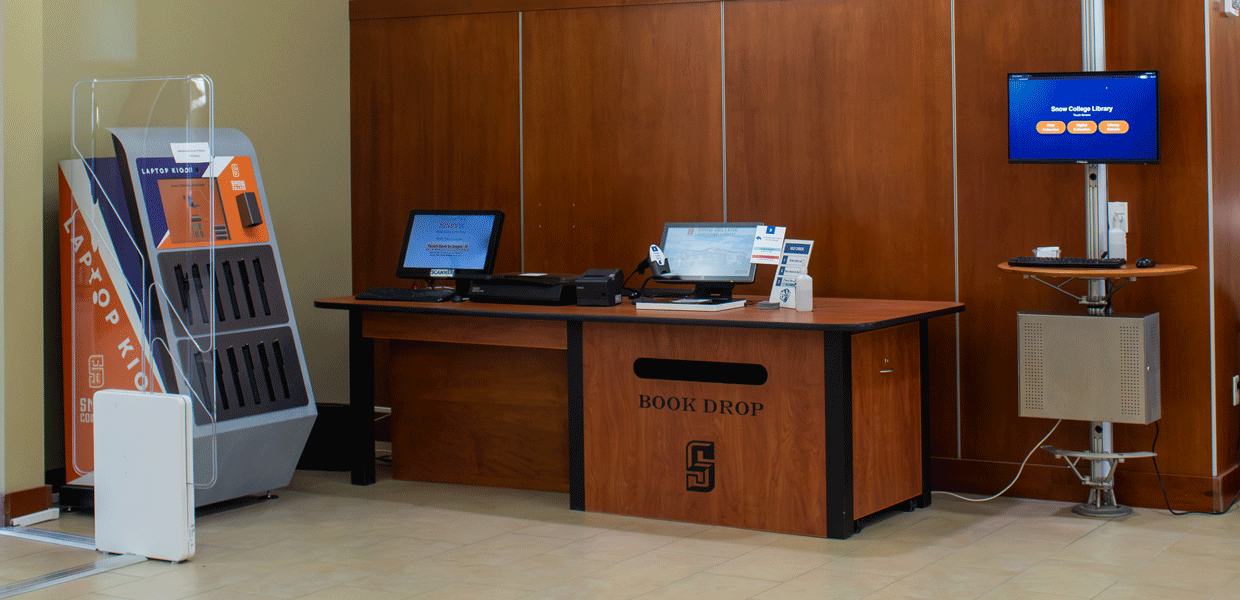
Need a laptop for a few hours? Visit the Laptop Kiosk at the front of the library for quick, self-service checkout.
How it works
- Head to the Laptop Kiosk near the library entrance.
- Scan your Snow College ID card and login to your Snow College account to check out a laptop.
- Use it anywhere inside the library for up to four hours.
- Return it to the kiosk when you're finished.
Good to know
These laptops can't leave the building. If you need one to take home, ask the front desk about a semester-long loan.
Save your files to a USB drive, OneDrive, or Google Drive before you finish.
Files left on the laptop are erased when it is logged out.
Late returns may result in a fee or a hold on your library account.
Semester-long laptop loans
Need a laptop for the whole semester? The library has a collection of laptops available for long-term checkout at the front desk.
How it works
- Visit the front desk during library hours.
- Sign a liability agreement accepting responsibility for any loss or damage.
- Take your laptop home and use it all semester, or until the due date you're given.
- Return it to the front desk by that due date.
Good to know
A new liability agreement is required with every checkout.
Laptops are available while supplies last, so check with the front desk as early as you can.
Bring the laptop to the front desk or contact the IT Helpdesk right away. Don't wait until the due date.
Cameras
Working on a class project, club event, or creative assignment? Cameras are available for three-day checkout from the front desk.
How it works
- Stop by the front desk and sign a camera agreement covering liability and the 72-hour checkout limit.
- Once your agreement is on file, check out a camera as often as you need for the rest of the semester, with no extra paperwork.
- Return the camera to the front desk within three days.
Good to know
Make sure batteries, memory cards, and chargers are all in the bag before you leave, and again when you return it.
Move your photos and videos off the memory card before you return the camera.
Cables & chargers
Low battery? Wrong cable? The front desk keeps a variety of cables and chargers on reserve for use inside the library. Just ask!
Tip: There are also charging stations around the library.
FAQs
No. Kiosk laptops are for in-library use only. If you need a laptop outside the library, ask the front desk about a semester-long loan.
When you check out a semester laptop or a camera, you sign an agreement accepting responsibility for lost or damaged equipment. You may be charged the cost of replacing the device.
Current Snow College students are eligible.
Yes, technology lending is available at both campuses.